Designing for Perceived Safety
Overview
As a brand renowned for its focus on safety, Volvo Cars wants its vehicles not only to be objectively safe but also to be perceived as safe by customers. For this master's thesis, we sought to expand the understanding of this area from an in-vehicle touchscreen UI perspective. The project was a collaboration with the Car User Research team, part of the UX department at Volvo Cars.
Certain details are under NDA and cannot be shared.
Discipline
UX Research
UX Design
Timeframe
6 months in 2025
Context
Master's thesis in collaboration with Volvo Cars
The Challenge
An Unseen Risk in Modern Cars
As car interiors shift from physical controls to large touchscreens, there are opportunities for cleaner cabins and greater functionality. However, this leads to interactions that require increased visual and cognitive demand because drivers must look at the screen to a greater extent.
In research, less attention has been given to drivers’ subjective experience of safety, especially in the context of digital UI design. This project aimed to explore this gap by asking two key questions:
How do fundamental interface design choices, specifically navigation structure and button size, influence a driver's perceived safety?
How can this subjective sense of safety be effectively measured and evaluated?
Research
A Mixed-Methods Approach
We employed a multi-phased approach grounded in both theory and empirical testing, moving from broad exploration to focused evaluation.
Foundational Research & Expert Insights
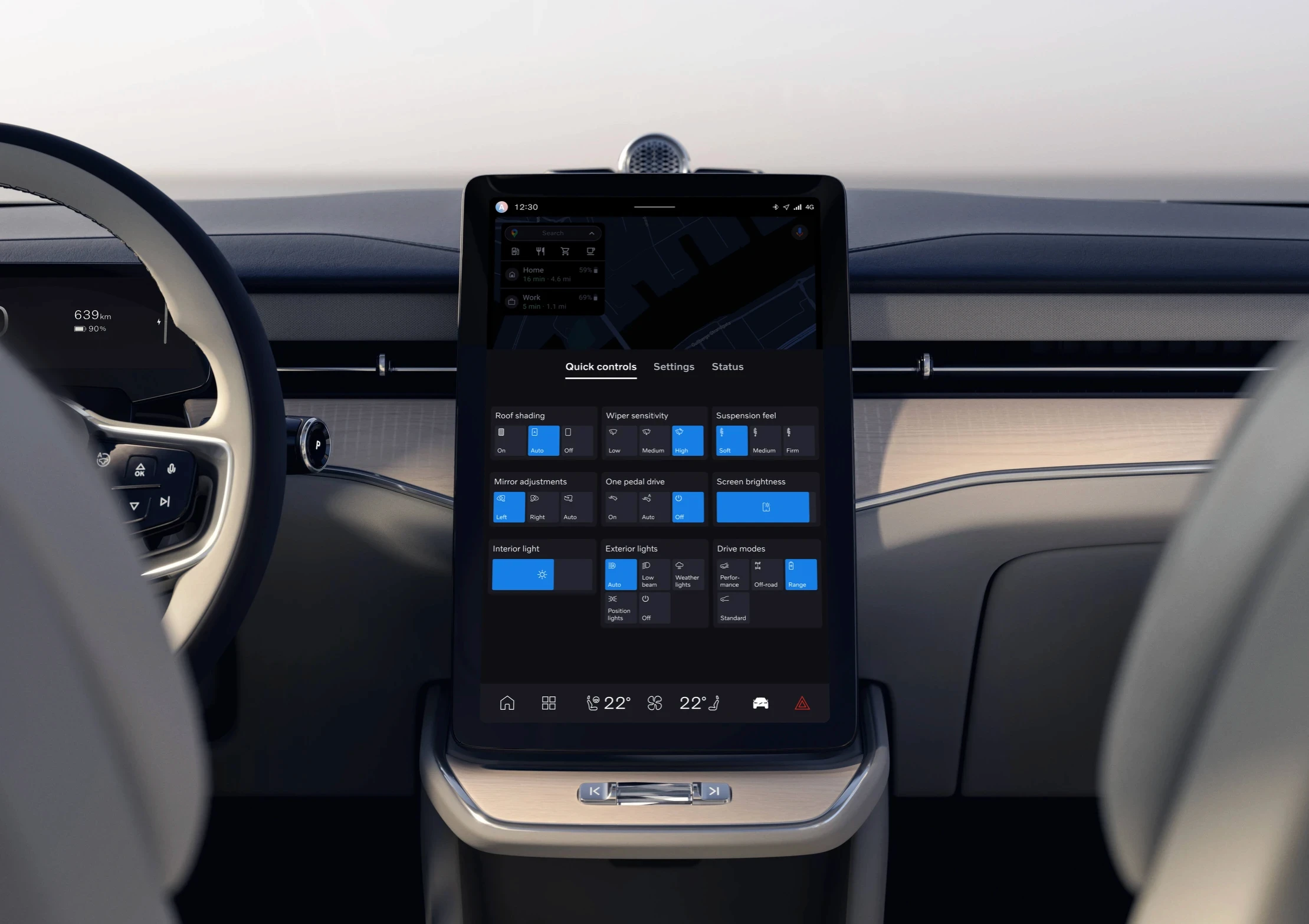
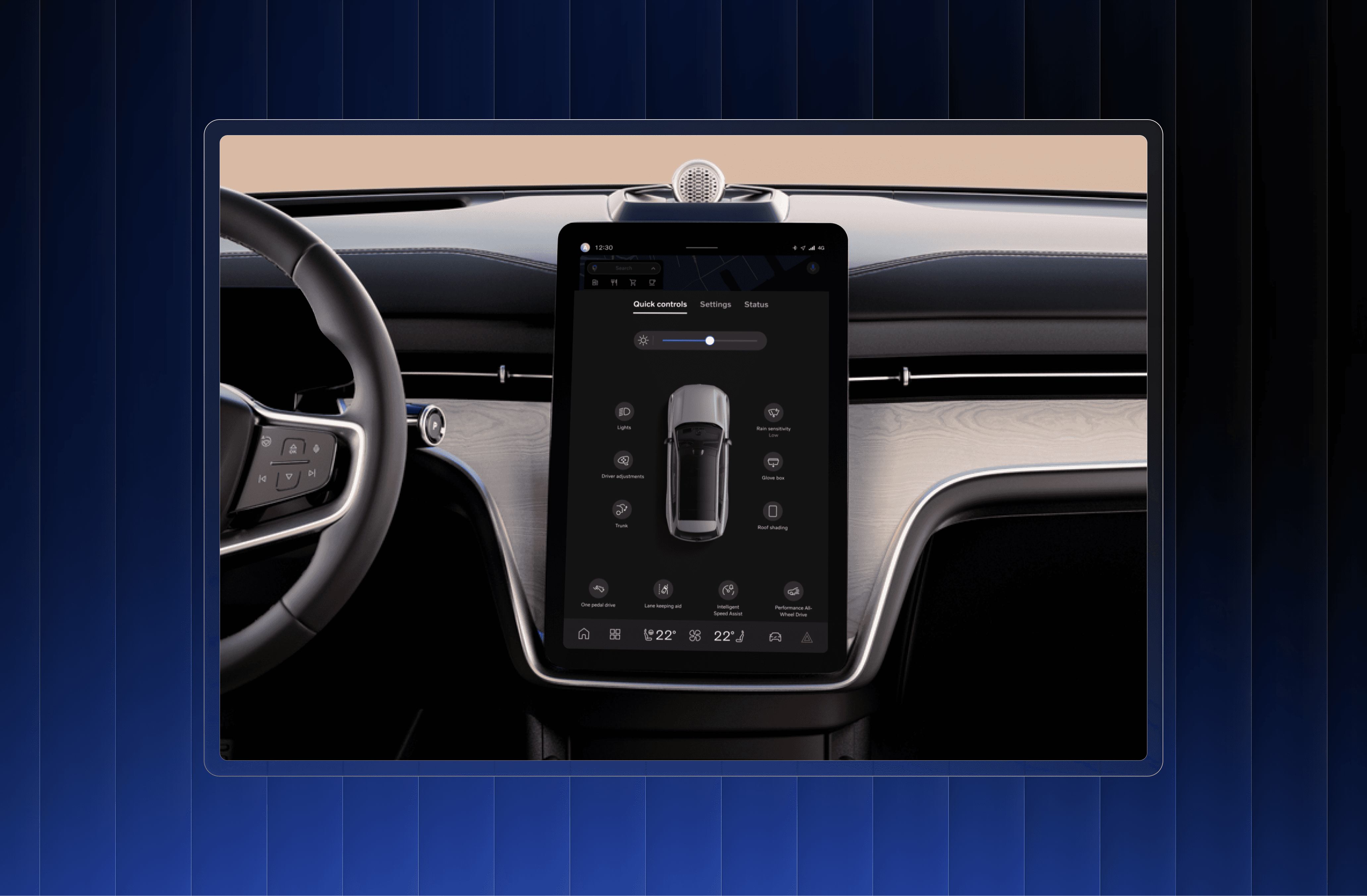
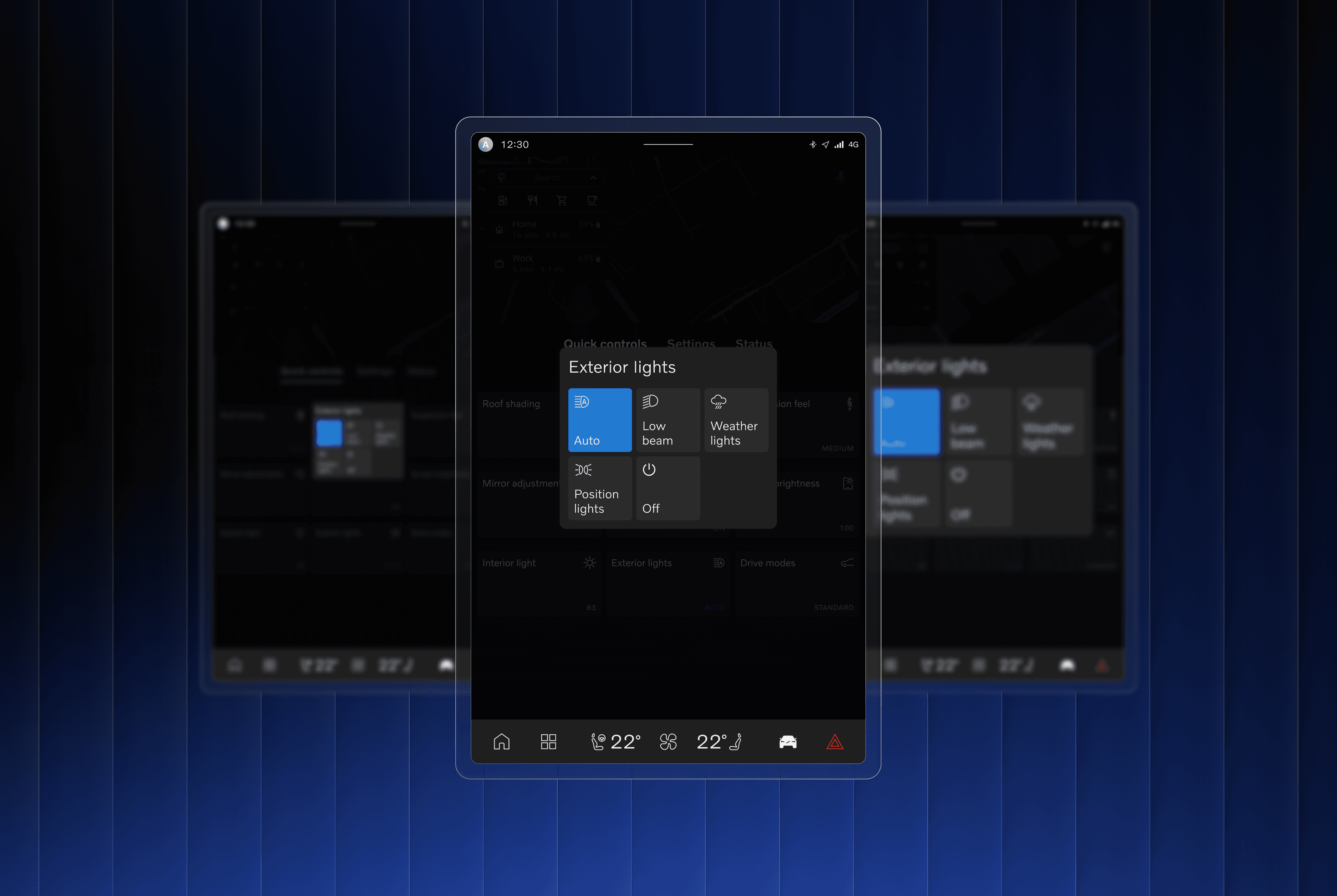
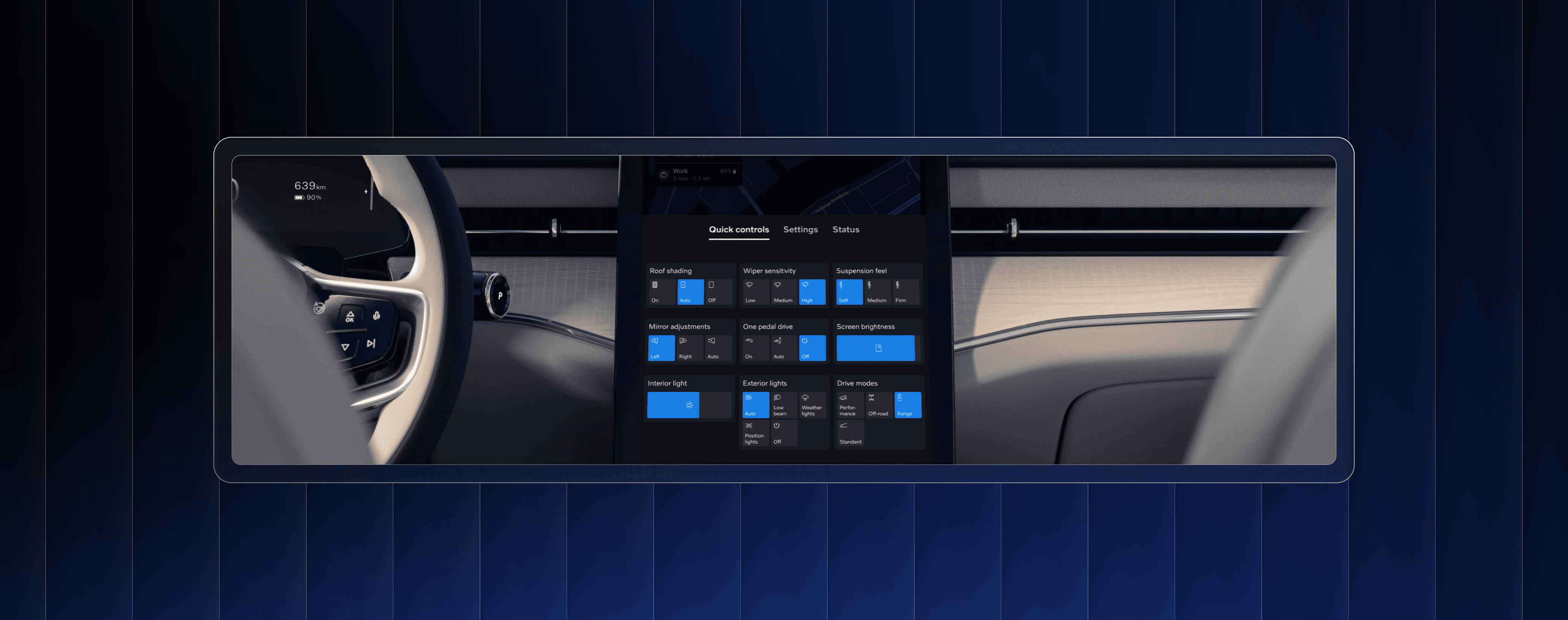
A literature review and semi-structured interviews with experts at Volvo Cars and Chalmers University of Technology helped define the problem space, identify the Quick Controls menu, which is a cluster of frequently accessed functions in an easily accessible view, as a prime area for investigation, and highlight navigation pain points for testing.
Concept Design & Prototypes
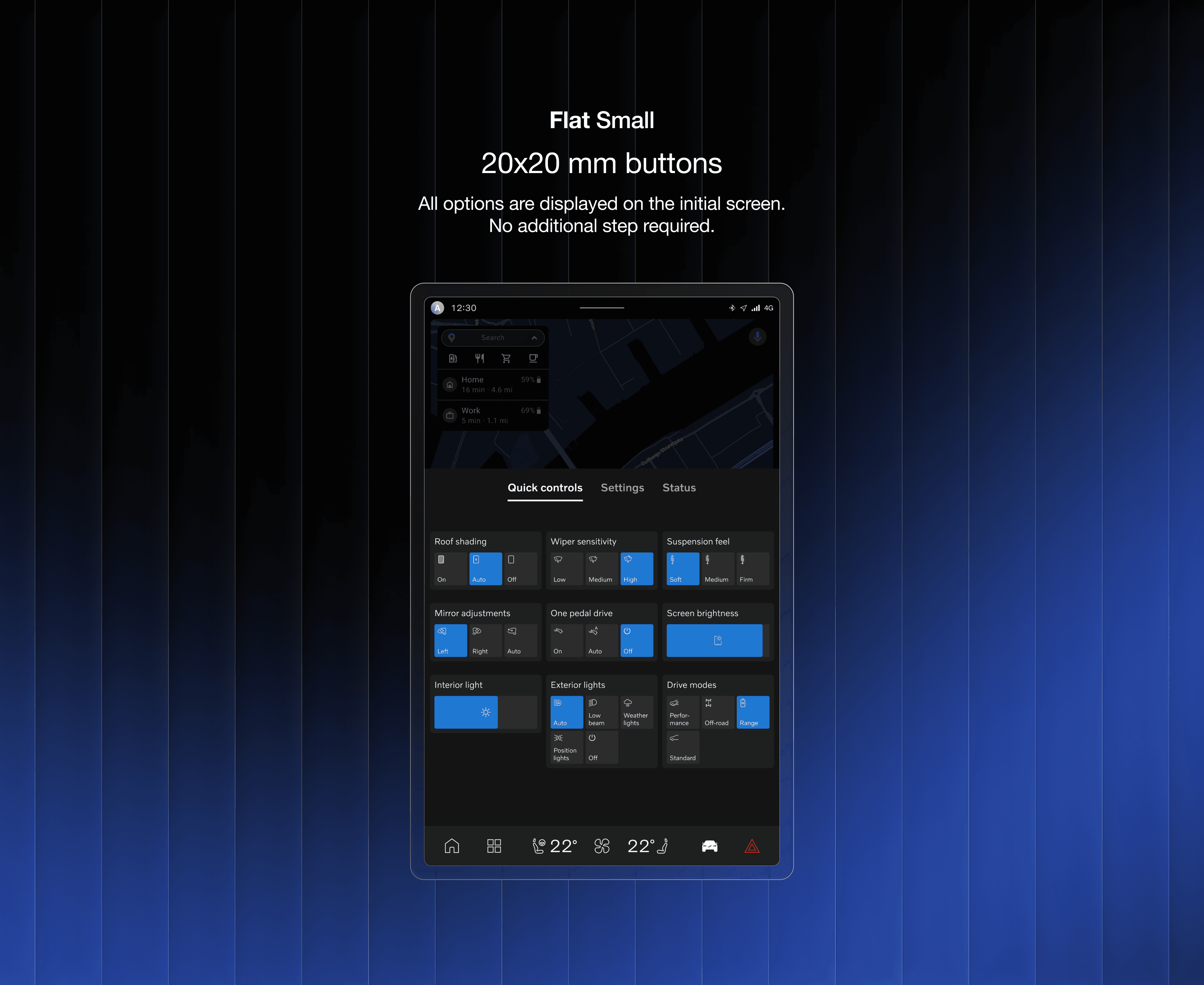
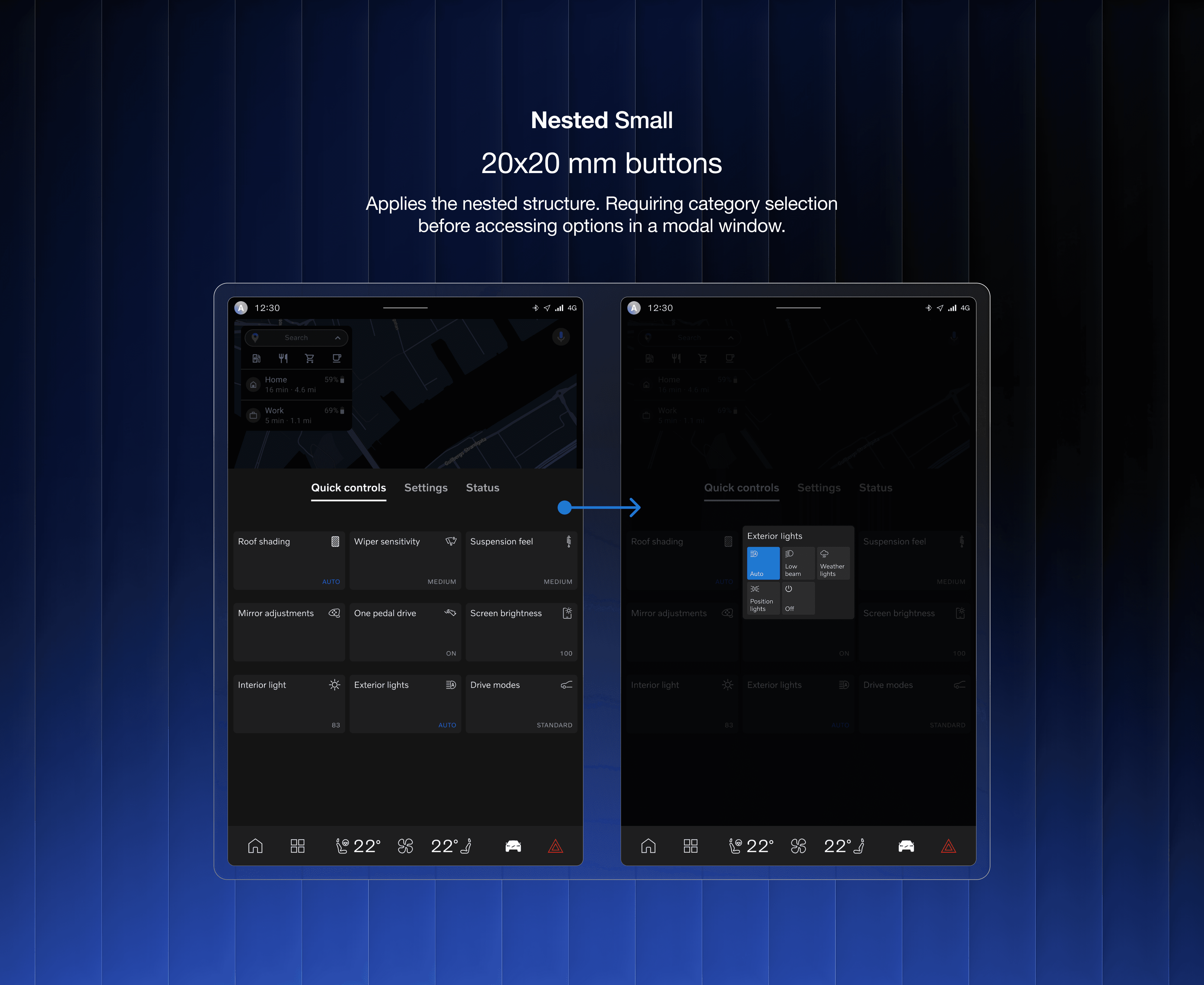
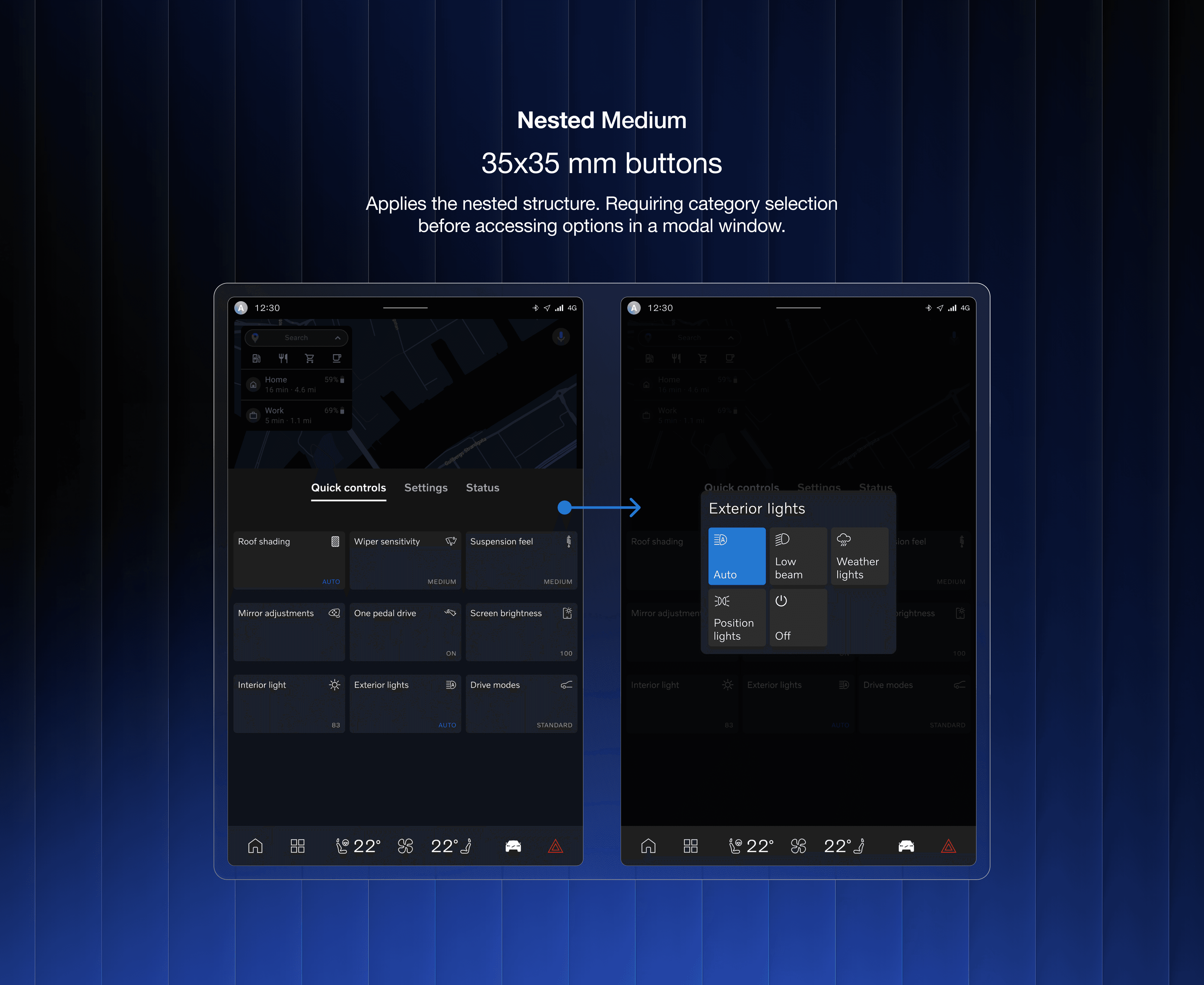
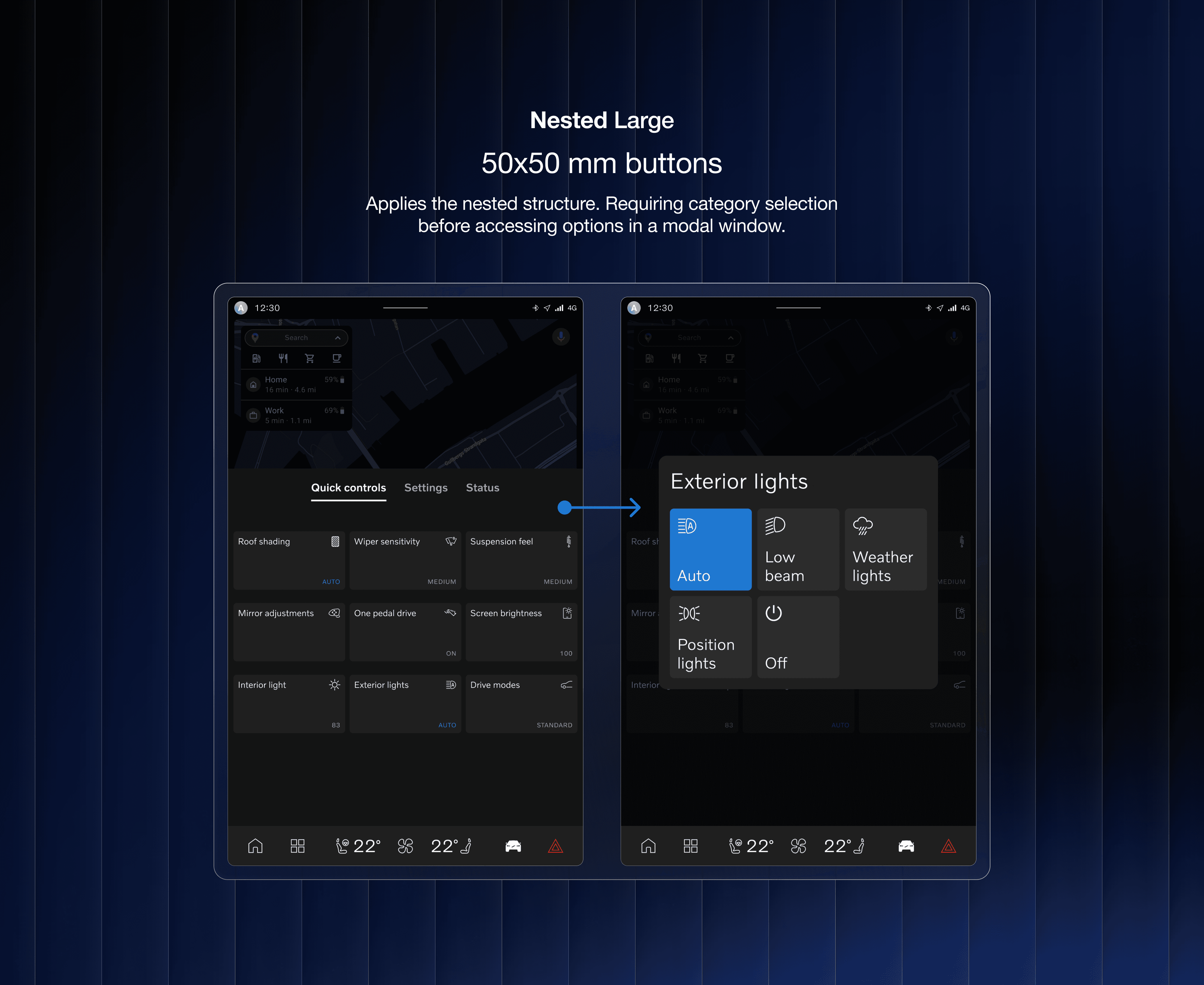
In collaboration with UX designers from Volvo Cars, we designed four UI concepts to test two key variables:
Navigation Structure
A Flat layout with all options on one screen.
A Nested layout that uses modals.
Button Size
We tested Small (20x20 mm), Medium (35x35 mm) and Large (50x50 mm) buttons.
The four concepts are referred to as Flat Small (FS), Nested Small (NS), Nested Medium (NM) and Nested Large (NL).
Real-World User Testing
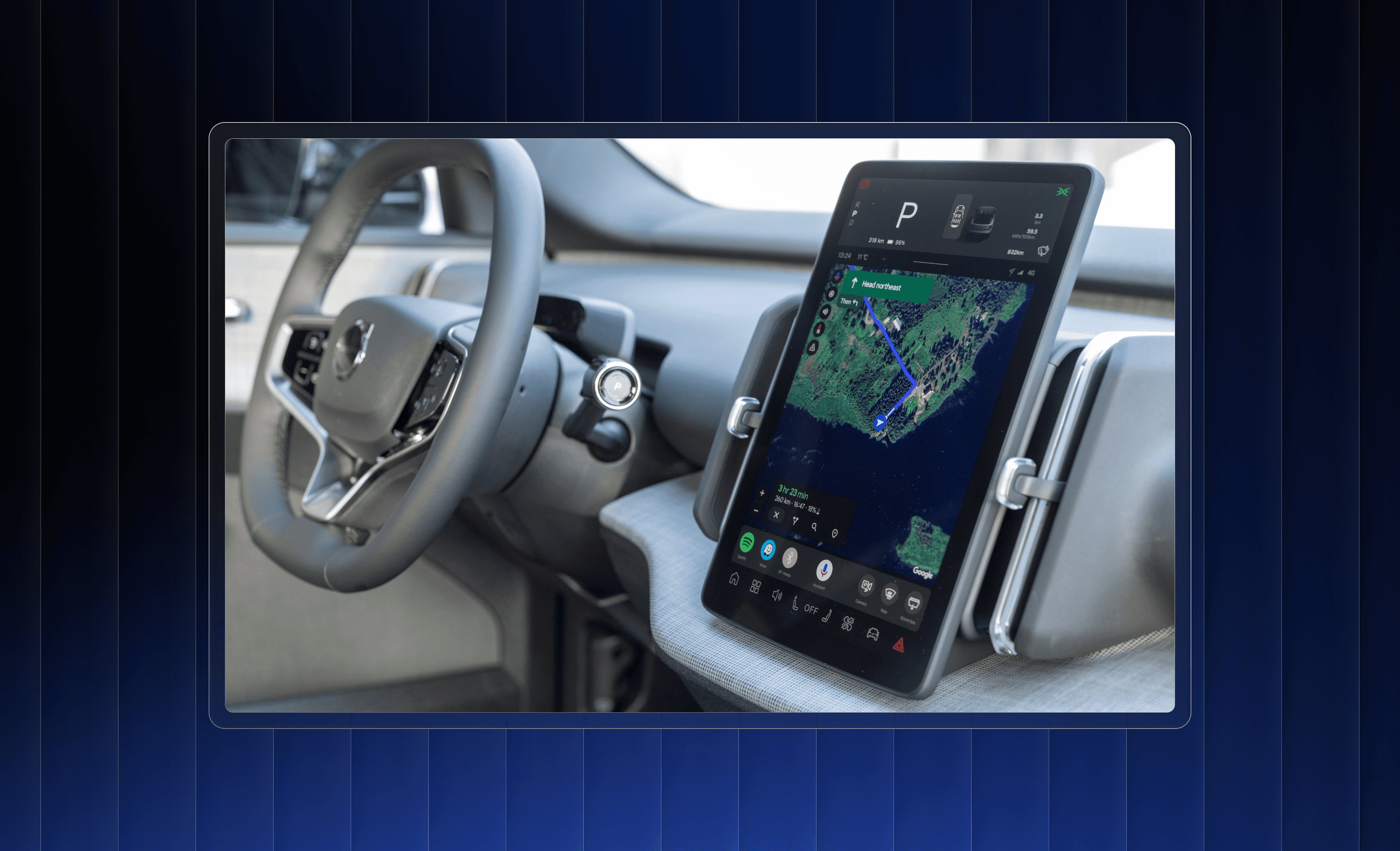
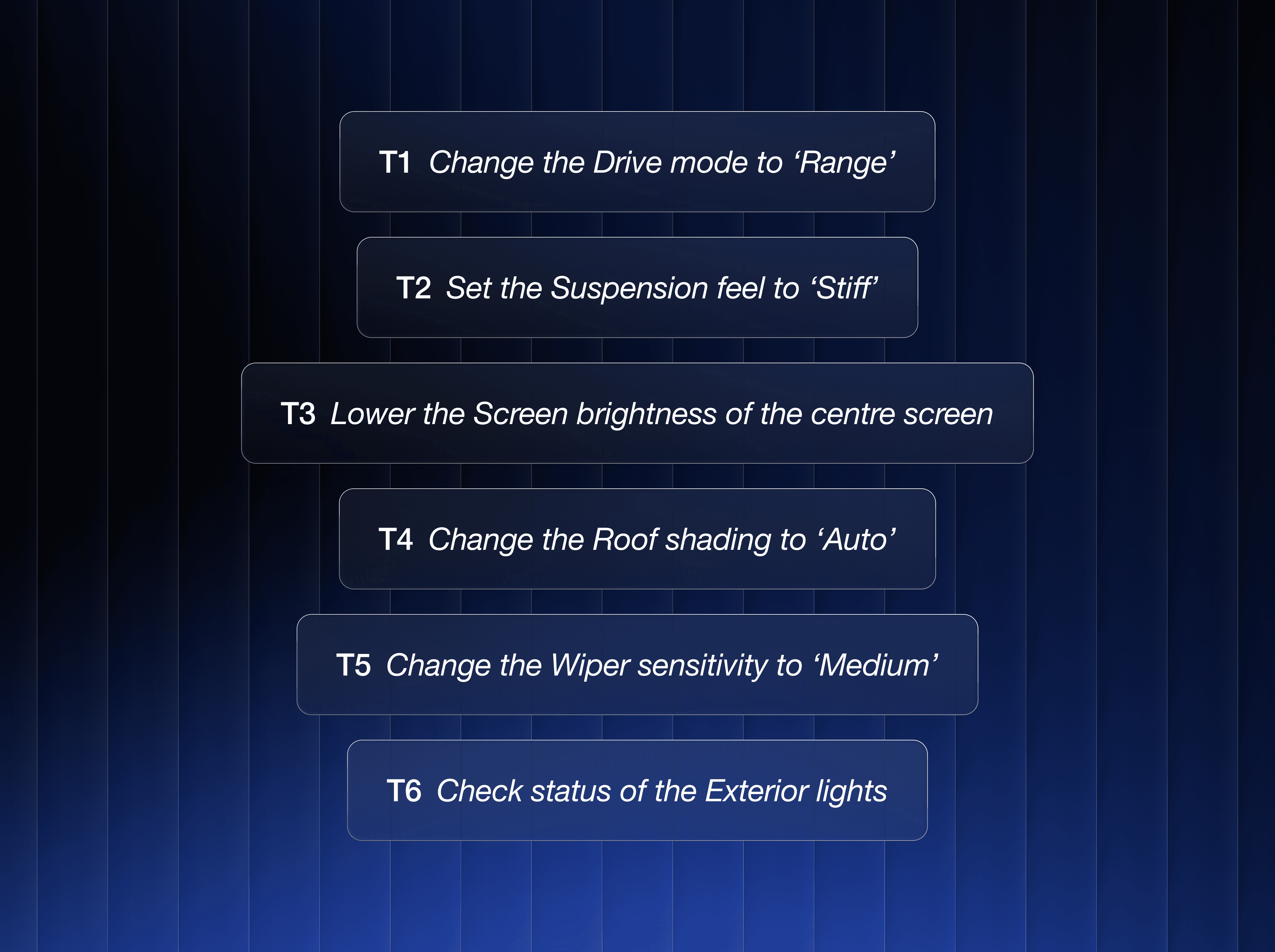
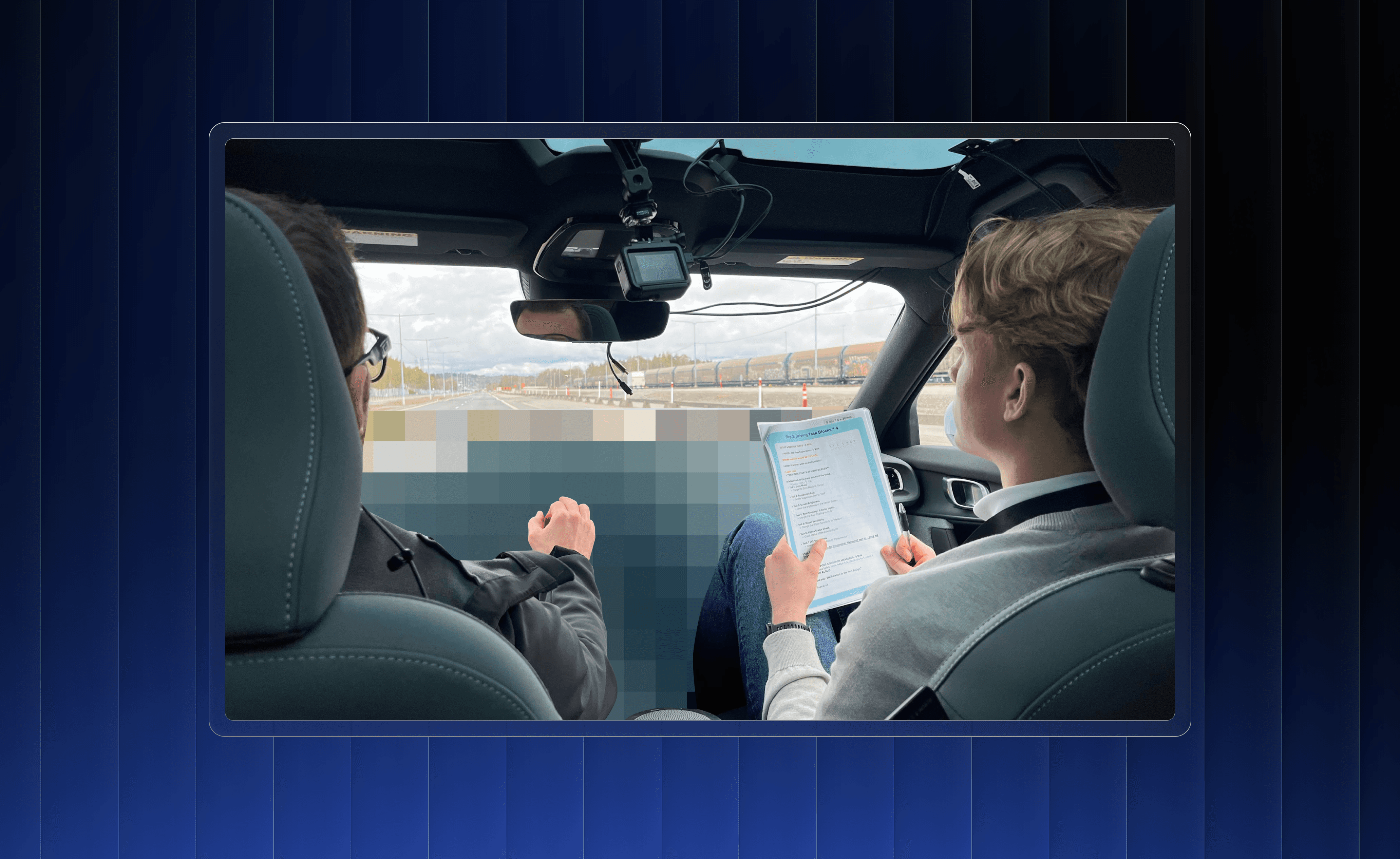
19 participants completed a within-subject test in a prototype vehicle (a modified Polestar 2) on Volvo's closed test track. While driving, participants performed typical tasks such as changing drive mode.
Collected Data
We gathered a triangulated dataset to test whether perceived safety reflects a unique aspect of the driving experience, one that should be designed for and measured independently.
Objective Data
Eye-tracking to measure glance behaviour, total eyes off-road time (TEORT) and task completion time (TCT).
Subjective Data
Questionnaires (Perceived Safety Scale, NASA-TLX, UMUX-Lite) and preference rankings to assess perceived safety, workload and usability.
Qualitative Data
Think-aloud protocols and post-test interviews to uncover the reasoning behind participants' actions and ratings.
Insights
Understanding Perceived Safety
Our results revealed critical insights into how drivers perceive and interact with in-vehicle UIs.
Navigating the Trade-Off
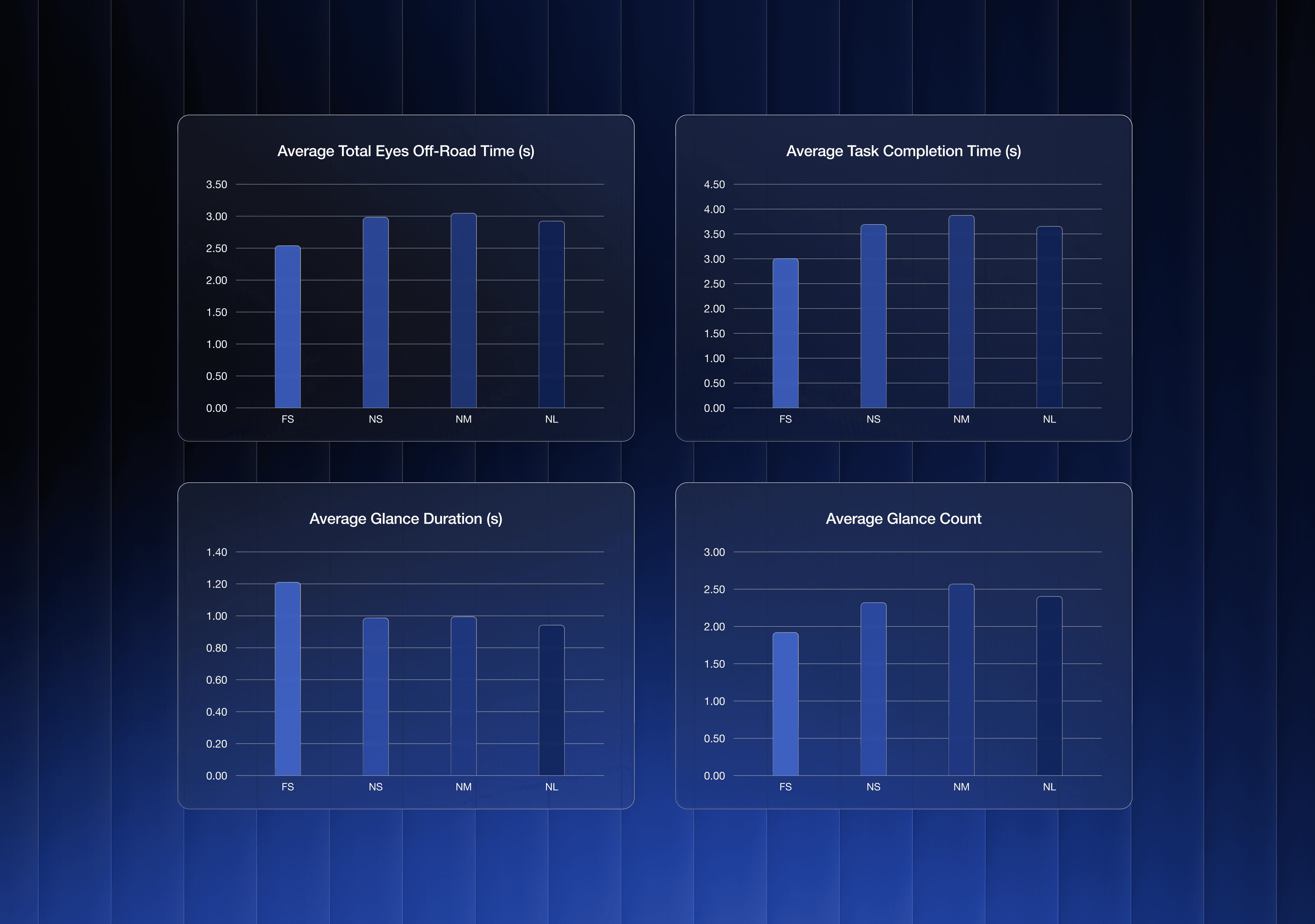
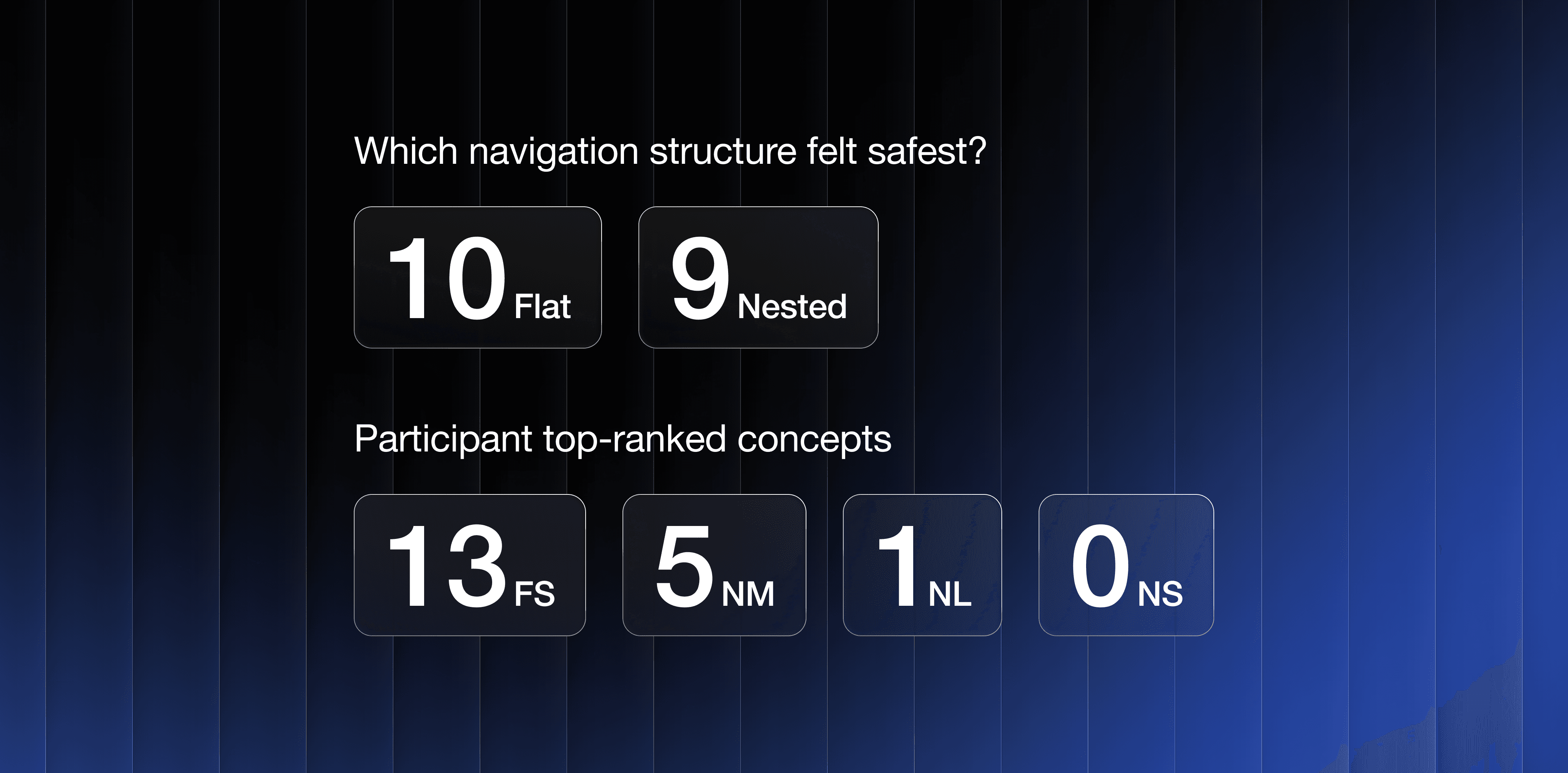
While the concept with the flat structure (FS) was the clear favourite in user preference rankings (chosen by 13 out of 19 participants) and was objectively faster, this speed came at a cost.
Flat (FS)
Offered the shortest task completion time and the fewest glances. However, it also produced the longest average glance durations and was the only design to cause NHTSA 2-second guideline violations.
Nested (NS), (NM), (NL)
Though slower due to the extra tap penalty, the nested structure naturally broke the task into smaller steps. This encouraged more frequent but shorter, safer glances and better attentional management.
NHTSA 2-Second Guideline
For at least 21 of the 24 test participants, the mean duration of all eye glances away from the forward road scene should be less than 2.0 seconds while performing the secondary task.

The Sweet Spot for Button Size
Within the nested concepts, button size strongly affected confidence and usability.
Small (20x20 mm)
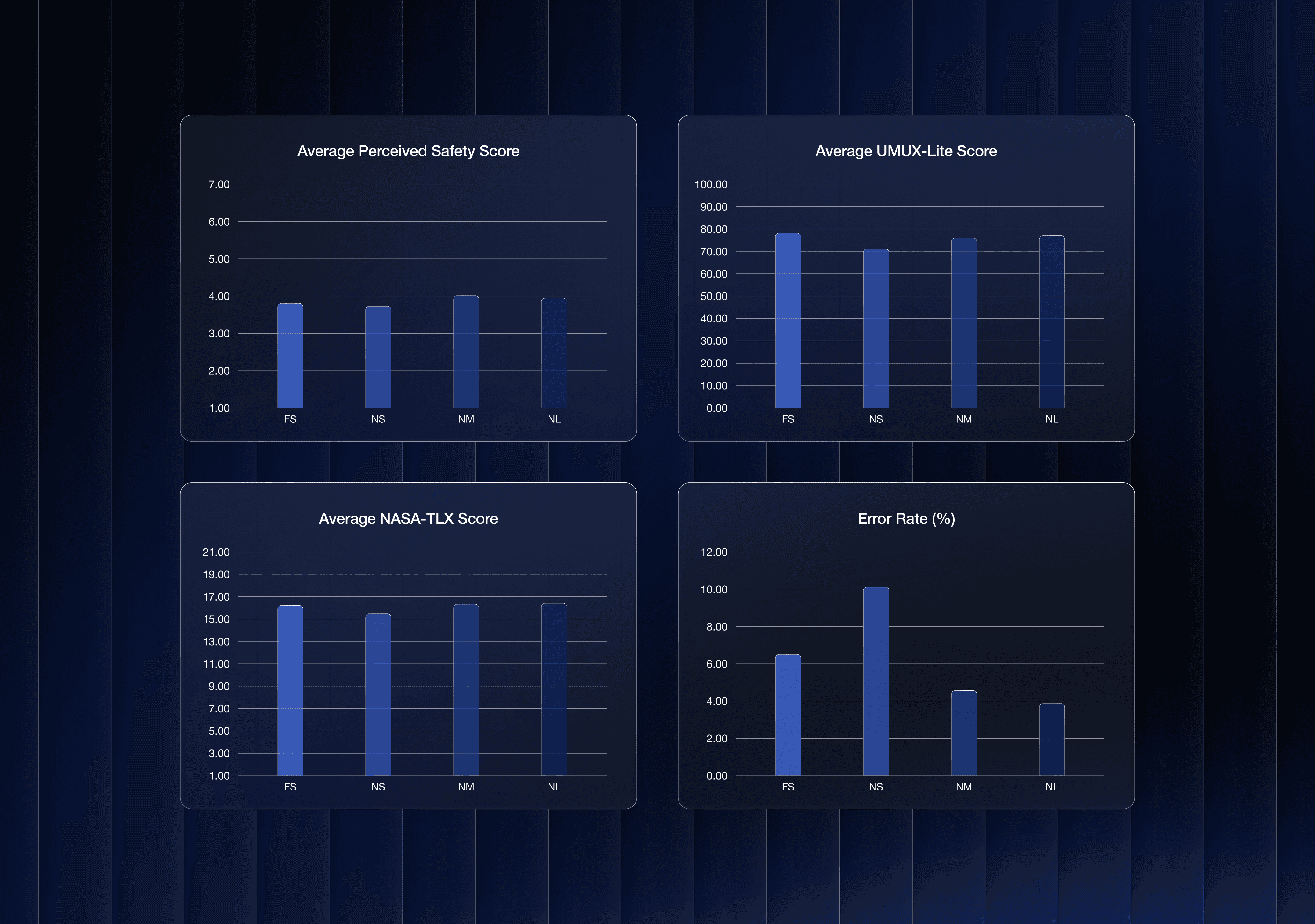
Resulted in a high error rate (number of misclicks divided by the total number of task attempts), low confidence and was perceived as the most frustrating and least safe option.
Large (50x50 mm)
Offered no significant additional safety benefit over medium and was sometimes seen as "childish" and ergonomically awkward.
Medium (35x35 mm)
Hit the sweet spot, providing a significant boost in perceived safety and confidence while remaining aesthetically and spatially balanced.
Perception vs. Reality
Many participants felt safer with the faster flat interface, as they described in interviews and think-aloud sessions, and demonstrated by giving it higher rankings. However, their glance patterns were objectively riskier. Designing for perceived safety, consequently, must mean aligning subjective feelings with objectively safe outcomes.
Guidelines
How to Approach Perceived Safety
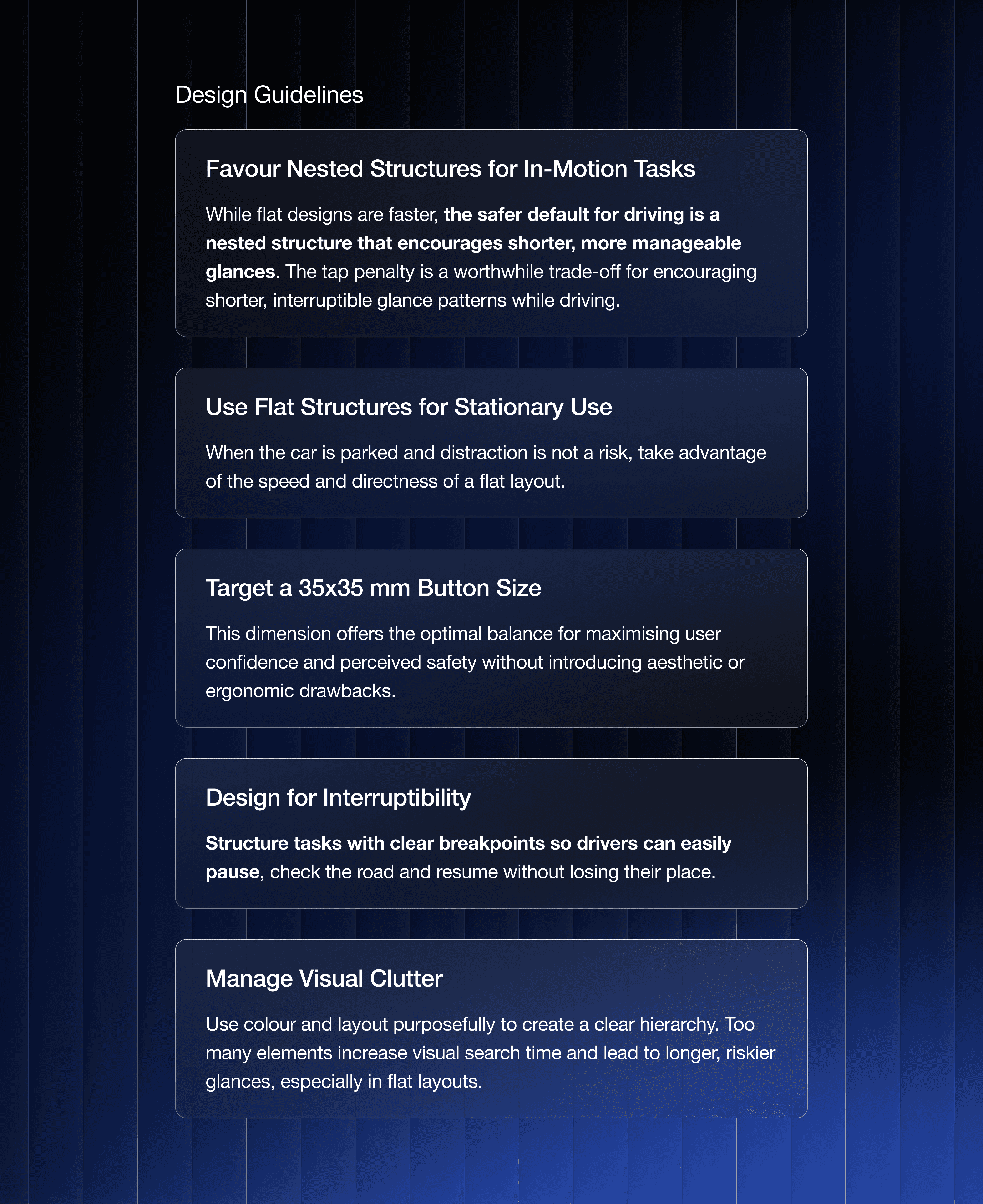
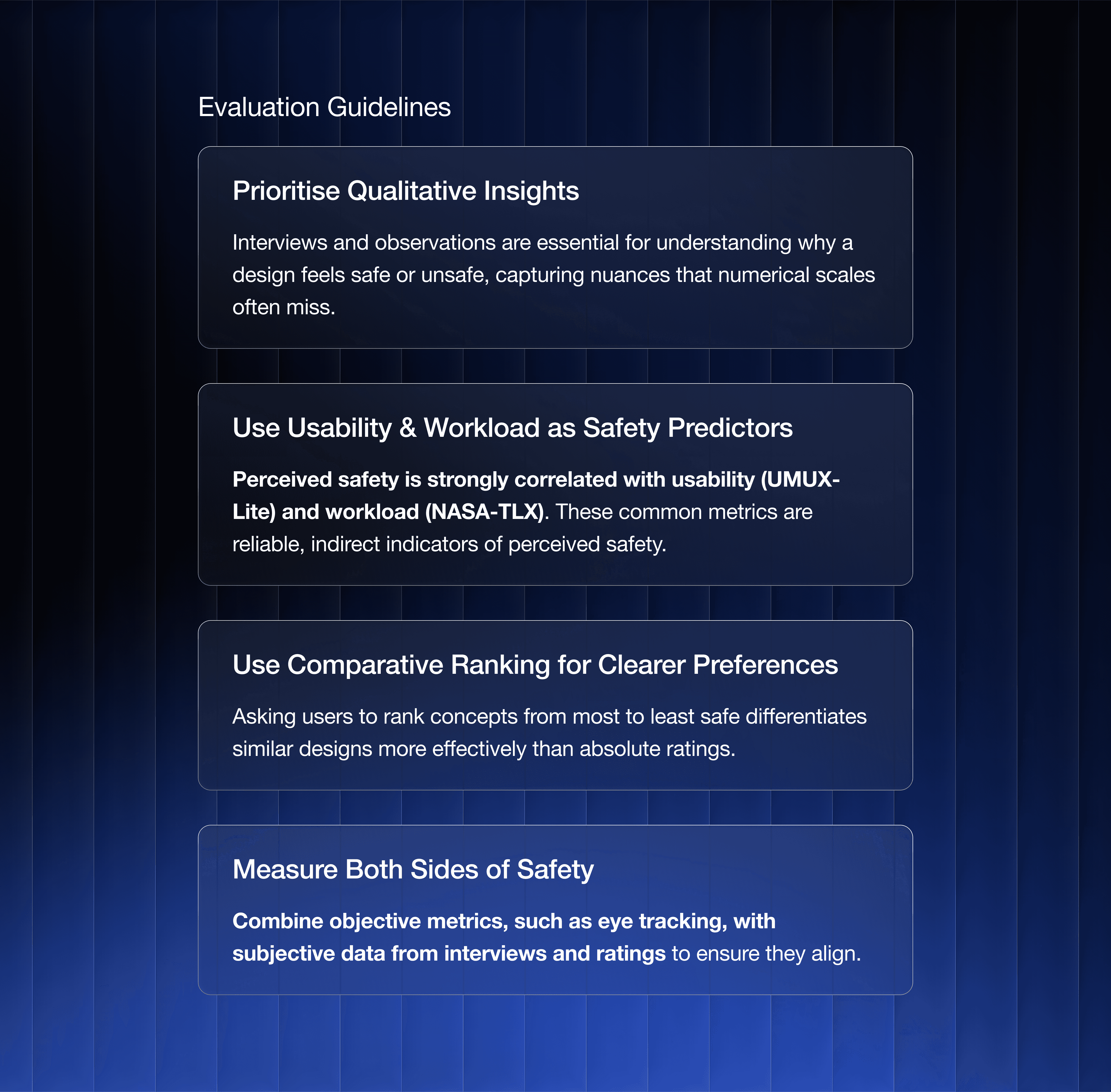
The outcome of this project was not a single UI but a set of guidelines to help designers and researchers create in-vehicle interfaces that are both objectively safe and perceived as such.
This is an excerpt of the guidelines – the complete set is available in the report.
Impact
Bridging the Gap Between Feeling and Fact
This research offers the automotive industry a tangible framework for making evidence-based UI design decisions. The findings challenge the assumption that faster is safer and provide a clear rationale for implementing specific design patterns, such as justifying the tap penalty of a nested design to achieve safer glance behaviour. These validated guidelines support designers in creating interfaces that not only perform safely but also foster a genuine sense of security in drivers.
Final Thoughts
Key Takeaways and Learnings
This project underscored the immense value of a mixed-methods approach. While quantitative data from eye-tracking and scales provided a solid foundation, the true depth of understanding came from the qualitative interviews. Hearing participants explain their reasoning revealed the critical disconnect between their perception of safety and their objective behaviour.
My key takeaway is that in safety-critical design, the user's mental model and feelings are just as important as objective performance metrics. The ultimate goal isn't just to build a safe system, but to build one where the user feels safe because the design intuitively guides them toward safer interactions.
Designing for Perceived Safety
Overview
As a brand renowned for its focus on safety, Volvo Cars wants its vehicles not only to be objectively safe but also to be perceived as safe by customers. For this master's thesis, we sought to expand the understanding of this area from an in-vehicle touchscreen UI perspective. The project was a collaboration with the Car User Research team, part of the UX department at Volvo Cars.
Certain details are under NDA and cannot be shared.
Discipline
UX Research
UX Design
Timeframe
6 months in 2025
Context
Master's thesis in collaboration with Volvo Cars
The Challenge
An Unseen Risk in Modern Cars
As car interiors shift from physical controls to large touchscreens, there are opportunities for cleaner cabins and greater functionality. However, this leads to interactions that require increased visual and cognitive demand because drivers must look at the screen to a greater extent.
In research, less attention has been given to drivers’ subjective experience of safety, especially in the context of digital UI design. This project aimed to explore this gap by asking two key questions:
How do fundamental interface design choices, specifically navigation structure and button size, influence a driver's perceived safety?
How can this subjective sense of safety be effectively measured and evaluated?
Research
A Mixed-Methods Approach
We employed a multi-phased approach grounded in both theory and empirical testing, moving from broad exploration to focused evaluation.
Foundational Research & Expert Insights
A literature review and semi-structured interviews with experts at Volvo Cars and Chalmers University of Technology helped define the problem space, identify the Quick Controls menu, which is a cluster of frequently accessed functions in an easily accessible view, as a prime area for investigation, and highlight navigation pain points for testing.
Concept Design & Prototypes
In collaboration with UX designers from Volvo Cars, we designed four UI concepts to test two key variables:
Navigation Structure
A Flat layout with all options on one screen.
A Nested layout that uses modals.
Button Size
We tested Small (20x20 mm), Medium (35x35 mm) and Large (50x50 mm) buttons.
The four concepts are referred to as Flat Small (FS), Nested Small (NS), Nested Medium (NM) and Nested Large (NL).
Real-World User Testing
19 participants completed a within-subject test in a prototype vehicle (a modified Polestar 2) on Volvo's closed test track. While driving, participants performed typical tasks such as changing drive mode.
Collected Data
We gathered a triangulated dataset to test whether perceived safety reflects a unique aspect of the driving experience, one that should be designed for and measured independently.
Objective Data
Eye-tracking to measure glance behaviour, total eyes off-road time (TEORT) and task completion time (TCT).
Subjective Data
Questionnaires (Perceived Safety Scale, NASA-TLX, UMUX-Lite) and preference rankings to assess perceived safety, workload and usability.
Qualitative Data
Think-aloud protocols and post-test interviews to uncover the reasoning behind participants' actions and ratings.
Insights
Understanding Perceived Safety
Our results revealed critical insights into how drivers perceive and interact with in-vehicle UIs.
Navigating the Trade-Off
While the concept with the flat structure (FS) was the clear favourite in user preference rankings (chosen by 13 out of 19 participants) and was objectively faster, this speed came at a cost.
Flat (FS)
Offered the shortest task completion time and the fewest glances. However, it also produced the longest average glance durations and was the only design to cause NHTSA 2-second guideline violations.
Nested (NS), (NM), (NL)
Though slower due to the extra tap penalty, the nested structure naturally broke the task into smaller steps. This encouraged more frequent but shorter, safer glances and better attentional management.
NHTSA 2-Second Guideline
For at least 21 of the 24 test participants, the mean duration of all eye glances away from the forward road scene should be less than 2.0 seconds while performing the secondary task.
The Sweet Spot for Button Size
Within the nested concepts, button size strongly affected confidence and usability.
Small (20x20 mm)
Resulted in a high error rate (number of misclicks divided by the total number of task attempts), low confidence and was perceived as the most frustrating and least safe option.
Large (50x50 mm)
Offered no significant additional safety benefit over medium and was sometimes seen as "childish" and ergonomically awkward.
Medium (35x35 mm)
Hit the sweet spot, providing a significant boost in perceived safety and confidence while remaining aesthetically and spatially balanced.
Perception vs. Reality
Many participants felt safer with the faster flat interface, as they described in interviews and think-aloud sessions, and demonstrated by giving it higher rankings. However, their glance patterns were objectively riskier. Designing for perceived safety, consequently, must mean aligning subjective feelings with objectively safe outcomes.
Guidelines
How to Approach Perceived Safety
The outcome of this project was not a single UI but a set of guidelines to help designers and researchers create in-vehicle interfaces that are both objectively safe and perceived as such.
This is an excerpt of the guidelines – the complete set is available in the report.
Impact
Bridging the Gap Between Feeling and Fact
This research offers the automotive industry a tangible framework for making evidence-based UI design decisions. The findings challenge the assumption that faster is safer and provide a clear rationale for implementing specific design patterns, such as justifying the tap penalty of a nested design to achieve safer glance behaviour. These validated guidelines support designers in creating interfaces that not only perform safely but also foster a genuine sense of security in drivers.
Final Thoughts
Key Takeaways and Learnings
This project underscored the immense value of a mixed-methods approach. While quantitative data from eye-tracking and scales provided a solid foundation, the true depth of understanding came from the qualitative interviews. Hearing participants explain their reasoning revealed the critical disconnect between their perception of safety and their objective behaviour.
My key takeaway is that in safety-critical design, the user's mental model and feelings are just as important as objective performance metrics. The ultimate goal isn't just to build a safe system, but to build one where the user feels safe because the design intuitively guides them toward safer interactions.
Designing for Perceived Safety
Overview
As a brand renowned for its focus on safety, Volvo Cars wants its vehicles not only to be objectively safe but also to be perceived as safe by customers. For this master's thesis, we sought to expand the understanding of this area from an in-vehicle touchscreen UI perspective. The project was a collaboration with the Car User Research team, part of the UX department at Volvo Cars.
Certain details are under NDA and cannot be shared.
Discipline
UX Research
UX Design
Timeframe
6 months in 2025
Context
Master's thesis in collaboration with Volvo Cars
The Challenge
An Unseen Risk in Modern Cars
As car interiors shift from physical controls to large touchscreens, there are opportunities for cleaner cabins and greater functionality. However, this leads to interactions that require increased visual and cognitive demand because drivers must look at the screen to a greater extent.
In research, less attention has been given to drivers’ subjective experience of safety, especially in the context of digital UI design. This project aimed to explore this gap by asking two key questions:
How do fundamental interface design choices, specifically navigation structure and button size, influence a driver's perceived safety?
How can this subjective sense of safety be effectively measured and evaluated?
Research
A Mixed-Methods Approach
We employed a multi-phased approach grounded in both theory and empirical testing, moving from broad exploration to focused evaluation.
Foundational Research & Expert Insights
A literature review and semi-structured interviews with experts at Volvo Cars and Chalmers University of Technology helped define the problem space, identify the Quick Controls menu, which is a cluster of frequently accessed functions in an easily accessible view, as a prime area for investigation, and highlight navigation pain points for testing.
Concept Design & Prototypes
In collaboration with UX designers from Volvo Cars, we designed four UI concepts to test two key variables:
Navigation Structure
A Flat layout with all options on one screen.
A Nested layout that uses modals.
Button Size
We tested Small (20x20 mm), Medium (35x35 mm) and Large (50x50 mm) buttons.
The four concepts are referred to as Flat Small (FS), Nested Small (NS), Nested Medium (NM) and Nested Large (NL).
Real-World User Testing
19 participants completed a within-subject test in a prototype vehicle (a modified Polestar 2) on Volvo's closed test track. While driving, participants performed typical tasks such as changing drive mode.
Collected Data
We gathered a triangulated dataset to test whether perceived safety reflects a unique aspect of the driving experience, one that should be designed for and measured independently.
Objective Data
Eye-tracking to measure glance behaviour, total eyes off-road time (TEORT) and task completion time (TCT).
Subjective Data
Questionnaires (Perceived Safety Scale, NASA-TLX, UMUX-Lite) and preference rankings to assess perceived safety, workload and usability.
Qualitative Data
Think-aloud protocols and post-test interviews to uncover the reasoning behind participants' actions and ratings.
Insights
Understanding Perceived Safety
Our results revealed critical insights into how drivers perceive and interact with in-vehicle UIs.
Navigating the Trade-Off
While the concept with the flat structure (FS) was the clear favourite in user preference rankings (chosen by 13 out of 19 participants) and was objectively faster, this speed came at a cost.
Flat (FS)
Offered the shortest task completion time and the fewest glances. However, it also produced the longest average glance durations and was the only design to cause NHTSA 2-second guideline violations.
Nested (NS), (NM), (NL)
Though slower due to the extra tap penalty, the nested structure naturally broke the task into smaller steps. This encouraged more frequent but shorter, safer glances and better attentional management.
NHTSA 2-Second Guideline
For at least 21 of the 24 test participants, the mean duration of all eye glances away from the forward road scene should be less than 2.0 seconds while performing the secondary task.
The Sweet Spot for Button Size
Within the nested concepts, button size strongly affected confidence and usability.
Small (20x20 mm)
Resulted in a high error rate (number of misclicks divided by the total number of task attempts), low confidence and was perceived as the most frustrating and least safe option.
Large (50x50 mm)
Offered no significant additional safety benefit over medium and was sometimes seen as "childish" and ergonomically awkward.
Medium (35x35 mm)
Hit the sweet spot, providing a significant boost in perceived safety and confidence while remaining aesthetically and spatially balanced.
Perception vs. Reality
Many participants felt safer with the faster flat interface, as they described in interviews and think-aloud sessions, and demonstrated by giving it higher rankings. However, their glance patterns were objectively riskier. Designing for perceived safety, consequently, must mean aligning subjective feelings with objectively safe outcomes.
Guidelines
How to Approach Perceived Safety
The outcome of this project was not a single UI but a set of guidelines to help designers and researchers create in-vehicle interfaces that are both objectively safe and perceived as such.
This is an excerpt of the guidelines – the complete set is available in the report.
Impact
Bridging the Gap Between Feeling and Fact
This research offers the automotive industry a tangible framework for making evidence-based UI design decisions. The findings challenge the assumption that faster is safer and provide a clear rationale for implementing specific design patterns, such as justifying the tap penalty of a nested design to achieve safer glance behaviour. These validated guidelines support designers in creating interfaces that not only perform safely but also foster a genuine sense of security in drivers.
Final Thoughts
Key Takeaways and Learnings
This project underscored the immense value of a mixed-methods approach. While quantitative data from eye-tracking and scales provided a solid foundation, the true depth of understanding came from the qualitative interviews. Hearing participants explain their reasoning revealed the critical disconnect between their perception of safety and their objective behaviour.
My key takeaway is that in safety-critical design, the user's mental model and feelings are just as important as objective performance metrics. The ultimate goal isn't just to build a safe system, but to build one where the user feels safe because the design intuitively guides them toward safer interactions.